How to Choose Telegram Account Management Software in 2026
Compare Telegram account management software in 2026. Evaluate account access, proxy settings, messaging, and shared inboxes with a practical two-account pilot.

A team can manage several Telegram accounts and still lose track of a customer asking for a quote. Sales sees the first message, support handles the follow-up, and neither knows who should reply next. Solve that workflow first when you evaluate Telegram account management software.
Start with the workflow that costs your team the most time. A two-account shift handoff can show whether the software gives each agent the access they need and helps the next agent pick up the conversation.
When the Official Telegram Client Is Enough
The official app supports switching between accounts. Telegram Business also offers features such as quick replies and away messages. If one person can respond to each account’s messages and keep track of pending work, the native tools may be enough. A dedicated multi-account workspace becomes useful when agents need to share coverage while managers control access to each work account.
What your team needs | Official Telegram tools | What to verify in a team workspace |
Access to several accounts | Switch between signed-in accounts | View account status, organize accounts by market or function, and assign them to agents |
Shared customer support | Handle chats in the relevant account and coordinate handoffs | See which account received a message and confirm which account sends the reply |
Community management | Use native group administrator roles, invite links, and channel posts | Review the groups you manage, see who is responsible, and track routine tasks |
Replies and updates | Use Telegram Business quick replies and away messages, or post channel updates | Share approved replies, coordinate opt-in campaigns, and see task status |
Six Features to Compare in 2026
Feature | What to look for | How to test it |
Multi-account management | Supported connection methods, bulk import, account groups, and status | Connect two team-managed accounts. Confirm you can tell which is connected and which needs attention. |
Proxy configuration | Visibility into network settings and control over who can change them | If your business uses a proxy, check the assigned setting and confirm who can edit it. |
Campaign management | Sender, audience, scheduling, and task status | Preview a relevant update for opted-in recipients, then check the status of an internal test. |
Group management | A list of the groups you administer and access to the member information you need | Verify access using a group your team manages and a limited-role user. |
Replies and translation | Saved replies, inbound auto-replies, and two-way translation | Test a routine question and a quote request. Check that dates, units, and quantities remain clear. |
Team permissions | Agent seats, account assignment, and access removal | Give an agent one account. Confirm they can answer there and cannot open the other account. |
For a support team, prioritize account access and the shift handoff. A community team should start with group permissions and moderation. If your team sends product or service updates, verify who may receive them, what the task status measures, and who handles replies.
How to Choose Telegram Account Management Software
1、Define a test your team runs every week.
An exporter might use a buyer asking for samples. Have an agent confirm the product specs, then ask the next shift to verify the shipping country before preparing a quote.
2、Check the handoff and offboarding.
Have the next agent find the original chat, identify the account, and reply from that same account. Revoke the first agent’s test access and confirm they can no longer open the workspace account.
3、Review how the vendor handles credentials and customer data.
Ask where login sessions are stored, who can access them, and how to revoke or delete them. Check what data you can export and what happens when you close the workspace.
4、Price the plan you would actually use.
Confirm how the vendor counts connected accounts and agent seats. Ask which features are live on that plan, and check the documentation and support channel during the trial.
Include one failure in the pilot. For example, disconnect a test account and check whether the workspace shows a clear status and your team knows who should reconnect it.
What to Test in GeekGram
GeekGram offers web-based Telegram account management, campaign tools, and a multi-account inbox. Use the same two test accounts for the checks below. The screenshots use English labels for the highlighted controls. Sample account and task data are masked.
Import Accounts and Review Their Status
In Account Import, choose a supported format for accounts your business is authorized to manage. The screenshot shows the ZIP archive option. Verify the import results, then group the accounts by market or business function. Treat exported login sessions as credentials and limit who can access them.
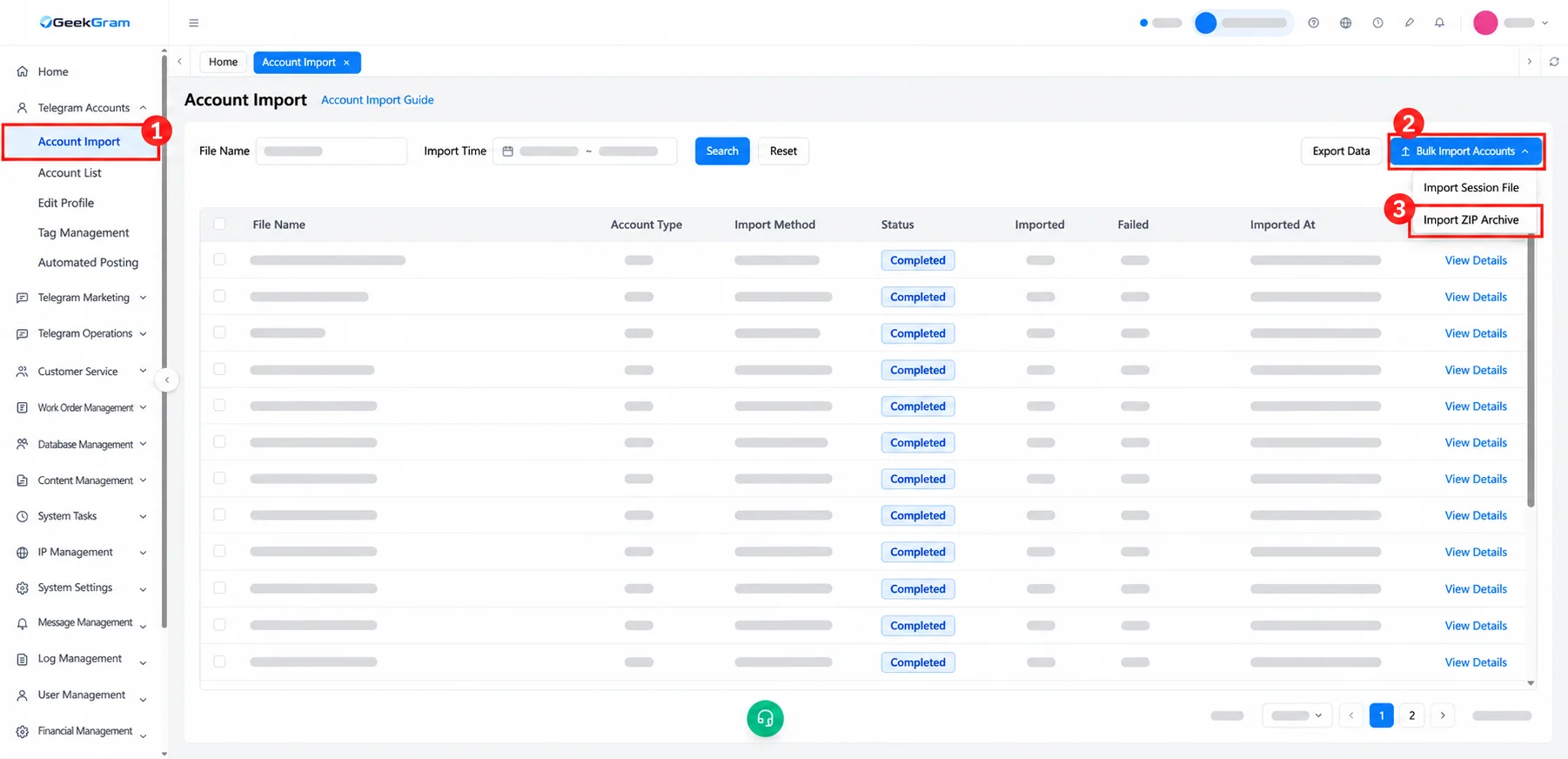
Figure 1. The Account Import page with Bulk Import Accounts and Import ZIP Archive highlighted.
Check Proxy Assignments if Your Team Uses Them
If your IT team requires a proxy, open the Account List and confirm which accounts have the approved configuration. The Bulk Assign Proxy IP dialog shows the login IP settings. Check which roles can change those settings.
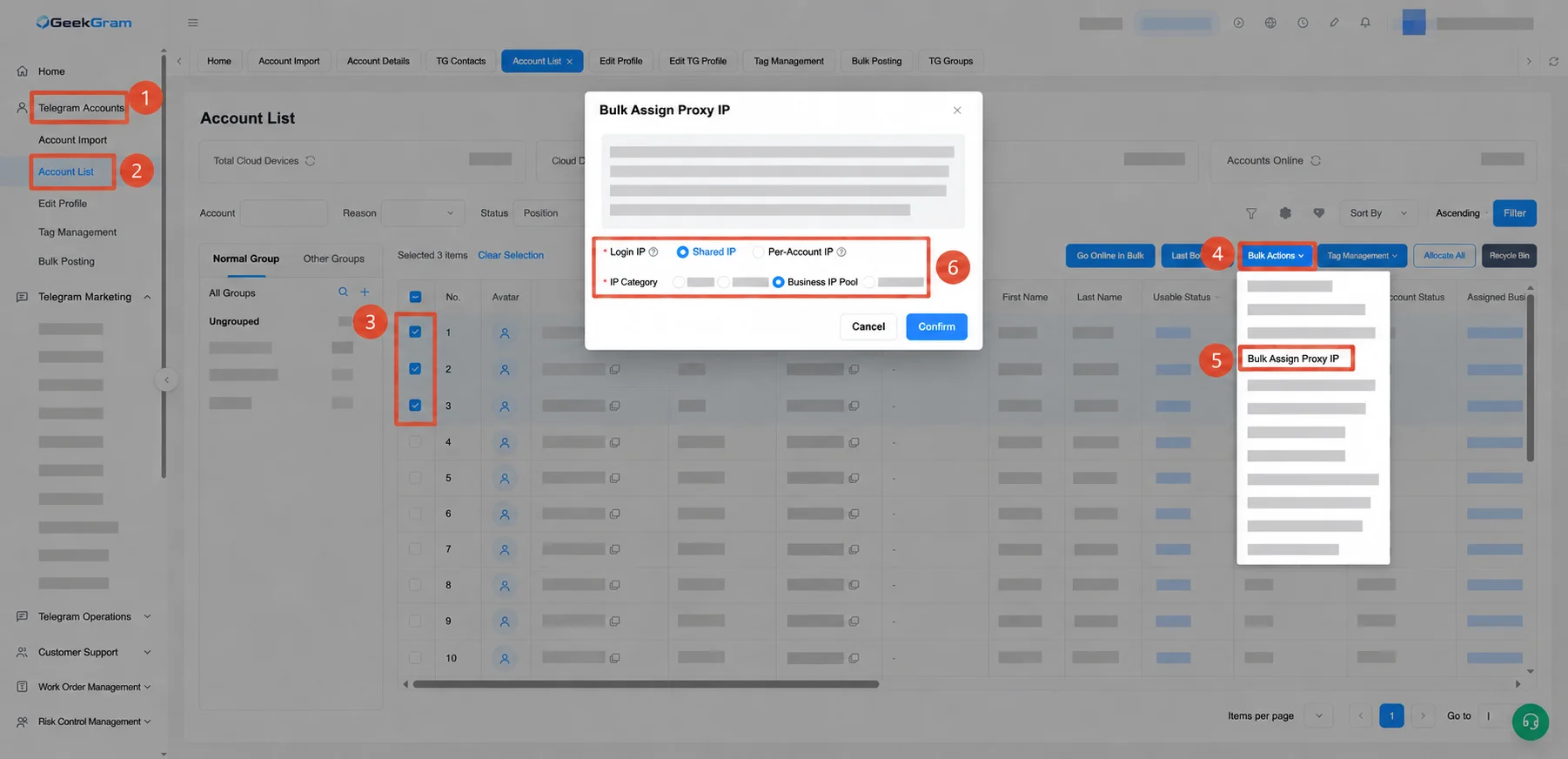
Figure 2. Selected accounts and the Bulk Assign Proxy IP dialog.
Review a Campaign and Test Reply Coverage
In Bulk Messaging, open New Campaign to set up an internal test. Review the sender, audience, message, and scheduled time. Check the task list for the result. For customer campaigns, use contacts who agreed to receive that type of update and honor requests to stop. For groups, confirm what each role can see and use member data only for the purpose members were told about.
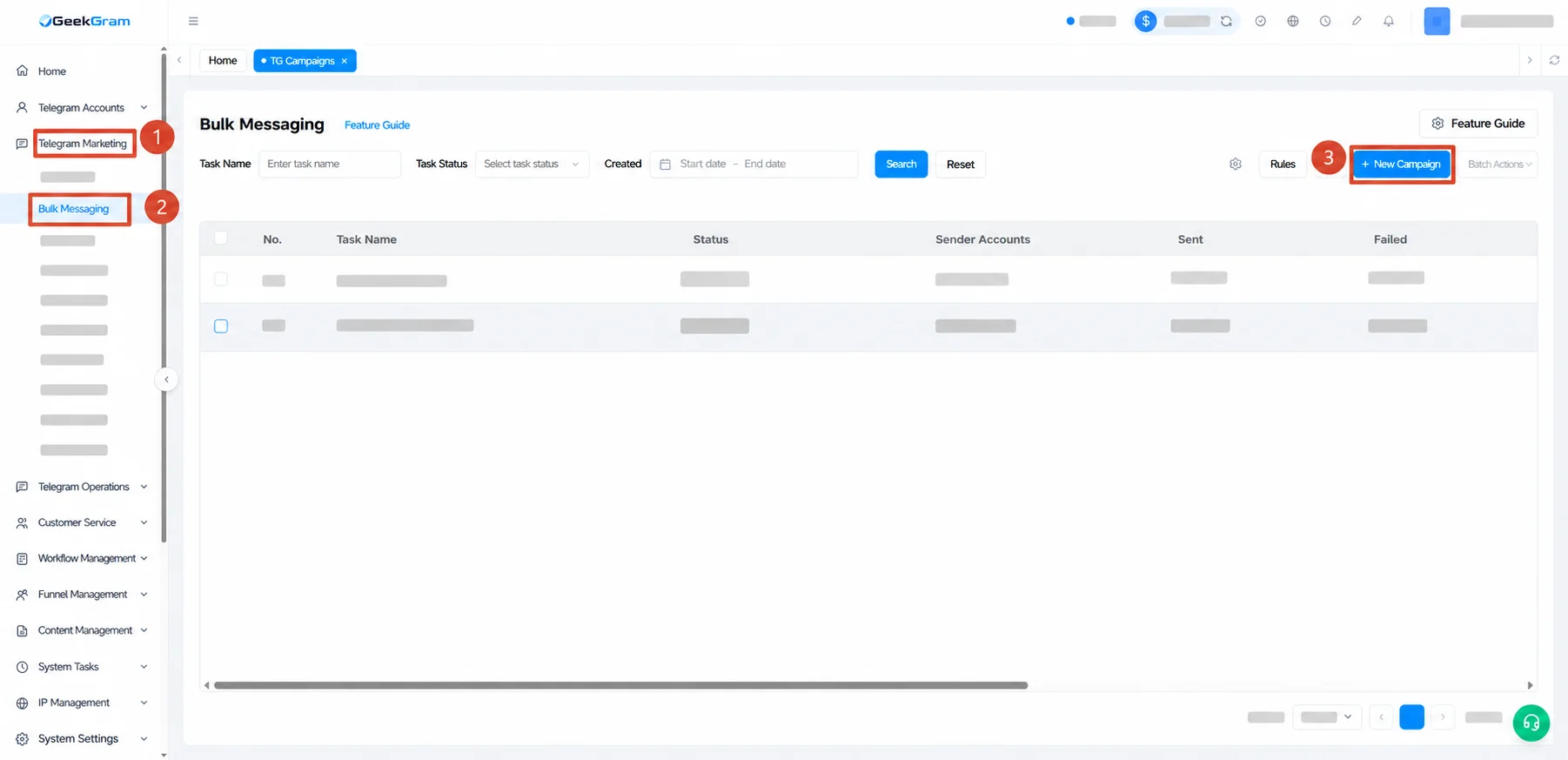
Figure 3. The Bulk Messaging task list and the New Campaign button.
Test Agent Access and Translation
Use the seat management controls to assign the two work accounts to the appropriate agents. In the inbox, test a saved reply and a handoff using a conversation from each account. GeekGram lists real-time two-way translation for more than 200 languages. Try the languages your team handles most often and verify prices, dates, and units against the original message.
Frequently Asked Questions
Can Telegram Account Management Software Prevent Bans?
Telegram decides when to restrict an account. Its spam rules apply to accounts connected to third-party tools. If Telegram restricts an account, pause the affected task and review the account notice and recent messages.
Does Every Telegram Account Need a Proxy?
This depends on how your company connects to Telegram. If your IT policy requires a proxy, check the assignment and permissions in the workspace. For teams with no such requirement, start by testing their existing connection.
What Is the Most Important Feature to Test First?
Start with the failure that would cost your team the most time or cause the biggest customer problem. If your brands share a support team, verify that each reply goes out from the right brand’s account before comparing features such as translation or scheduling.
Explore GeekGram
Use your trial checklist to see how GeekGram fits your team’s accounts, agent roles, and customer languages.
Originally published by Geekgram. Please credit the source when reposting.