How to Support Overseas Customers on Telegram with Two-Way Translation
Translate Telegram support chats across multiple accounts in four steps. Check Spanish, Portuguese, and French replies before sending.

One agent starts the day with three Telegram accounts to cover. A buyer in Mexico asks for samples in Spanish, a buyer in Brazil asks about minimum order quantities in Portuguese, and a customer in France wants a shipping update. While the agent drafts the Portuguese reply, the French customer sends an order number. The agent has to keep track of which reply belongs to which conversation.
For Telegram multilingual customer support, a reply is ready when the sending account, language, and business details match the inquiry. Use the same four steps for each conversation so you can handle all three accounts without losing track of the next action.
Triage Three Multilingual Telegram Inquiries
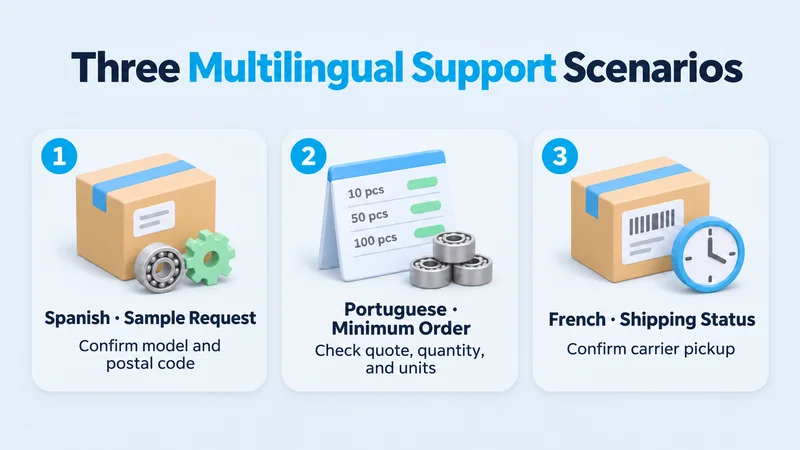
Start with an inquiry you can move forward now. Ask for a missing postal code while you wait for the current quote or a warehouse update. If you need more time, tell the customer what you’re checking and record the next action.
Account and language | Customer message | What to check |
Inquiries · Spanish (Mexico) | “¿Pueden enviar dos muestras a Monterrey?” (Can you send two samples to Monterrey?) | Ask for the model and delivery postal code before quoting sample freight. |
Quotes · Portuguese (Brazil) | “Qual é o pedido mínimo para o modelo P-25?” (What’s the minimum order quantity for model P-25?) | Check the current quote sheet. If trial orders and standard orders have different minimums, state both quantities and units. |
After-sales · French (France) | “Ma commande a-t-elle été expédiée ?” (Has my order shipped?) | Match the order number and check whether the carrier has picked up the parcel. |
How to Translate Telegram Support Chats in Four Steps
Confirm the account and customer.
Open the conversation under the business account that received it. If the buyer has contacted sales and after-sales, check the earlier messages for any commitments.
Read the translation alongside the original.
Identify the request and compare critical details such as a model number, quantity, or delivery address against the source.
Draft the reply in your working language.
State what you have confirmed and what you need from the customer. For the sample inquiry, ask for the delivery postal code so you can calculate freight.
Check the translated reply before sending.
Verify the sending account, customer, and reply language. For quotes and shipping updates, compare units, prices, and order status against the relevant record. Add pending tasks to the team’s handoff log.
Save short replies for recurring questions such as “What’s the delivery postal code?” Fill in the model, quantity, or order number for the current conversation before using a template.
If the tracking record shows a label and the parcel is waiting for pickup, draft “We’ve created your shipping label. Your parcel is waiting for carrier pickup. We’ll send tracking details after pickup.” In French, that could read “L’étiquette d’expédition a été créée. Le colis est en attente de prise en charge par le transporteur. Nous vous enverrons les informations de suivi après l’enlèvement.”
Use Two-Way Translation in a Multilingual Shared Inbox
Two-way Telegram chat translation means reading an incoming message in your working language and translating your reply into the customer’s language. Both translations can happen in the same conversation, where the agent can compare the result with the original before sending.
In the GeekGram multi-account inbox, open a chat under the business account that received it. An English-speaking agent can read the Spanish message in English, draft an answer, and review the Spanish translation before sending. When the French customer adds an order number, the agent can return to that account’s original chat and continue the shipping check.
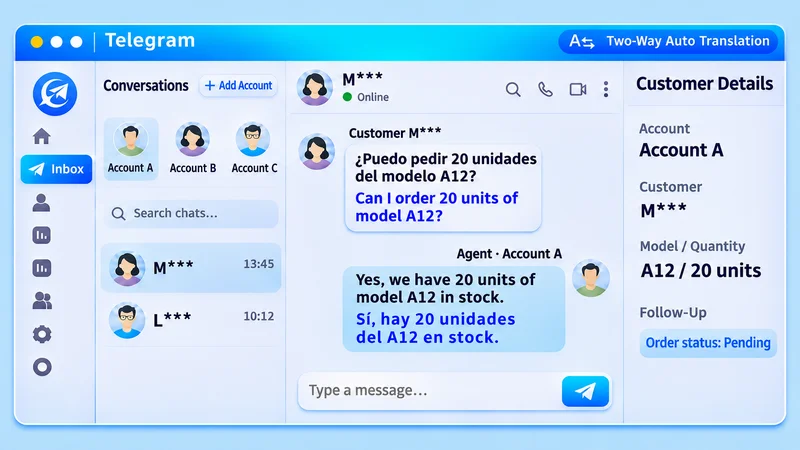
Illustrative interface. The A12 example shows an English draft and its Spanish translation for a 20-unit inquiry.
Run a Three-Chat Trial With One Agent
Use two or three Telegram accounts your team manages and route the three sample, quantity, and shipping questions to one agent. Then review these results.
1、Account and language.
Confirm that each reply reached the test recipient from the correct business account and in the expected language.
2、Translation accuracy.
Compare model numbers, quantities, units, and order status with the original messages and the records used to answer.
3、Time and tool switching.
Record external tool switches and the time between the incoming message and the agent’s first human reply. Compare the same three scenarios with your current process.
The entries below are illustrative. Use your own timings and record the fields that actually needed an edit.
Test conversation | Language | Tool switches | First human reply | Fields to review |
Sample request | Spanish | 0 | 2 min 40 sec | Model, postal code |
Minimum order | Portuguese | 0 | 3 min 10 sec | P-25, quantity unit |
Shipping status | French | 0 | 1 min 55 sec | Label created, carrier pickup |
Eligible new users can start a free 3-day GeekGram trial with 200 account slots (ports). Check the offer page for current terms.
Frequently Asked Questions
Does Two-Way Translation Send Replies Automatically?
In the workflow above, an agent reviews the translation and selects when to send it. Check your workspace’s automation settings and keep quotes, delivery commitments, and status updates under agent review.
How Can Agents Reply From the Correct Telegram Account?
Check the account label and conversation history before sending. When a customer contacts two accounts, use the order number or the earlier agreement to make sure the reply belongs in the open thread.
What if a Translation Gets the Quantity or Shipping Status Wrong?
Compare the translated text with the original and the latest business record. Keep a glossary for product codes, units, and statuses such as “label created” and “picked up by carrier.”
Which Languages and Translation Providers Does GeekGram Support?
GeekGram lists real-time translation for 100+ languages. Options such as Google, Microsoft, and DeepL depend on your plan and settings. Test the language pairs you use most in both directions.
Which Teams Benefit From This Workflow?
It suits exporters, sales teams, and after-sales teams that share responsibility for several Telegram accounts and regularly answer customers in more than one language.
Try GeekGram free for 3 days with 200 ports. Run the three chats with one agent before adding more accounts or shifts.
Originally published by Geekgram. Please credit the source when reposting.