Telegram Bulk Messaging with Channels, Groups, and the Bot API
Compare Telegram channels, groups, and the Bot API for bulk messaging. Check audience permissions and reply paths, then run a small pilot.

Use a Telegram channel for subscriber announcements, a Telegram group for member discussions, and the Telegram Bot API for automated notifications people have agreed to receive. Before choosing a Telegram bulk messaging tool, decide who should receive the message and where your team will handle replies.
Telegram’s Terms of Service prohibit spam. For each message, check whether the recipients expect that content from your business. That expectation should come from the channel they subscribed to, the group they joined, or the updates they opted into.
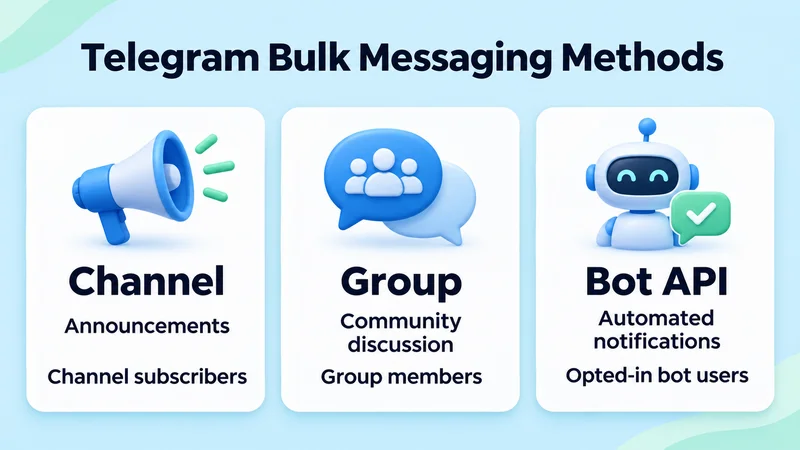
The Bot API example shows private notifications from a bot.
If your goal is to | Choose | Before you send |
Publish release notes and brand updates | Channel | Give interested readers a way to subscribe. |
Discuss an event or onboard a community | Group | Confirm membership, posting rules, and who will moderate. |
Send order updates or service alerts | Bot API | Confirm bot messaging access and opt-in for those updates. |
Reach a new audience | Build an opt-in audience | Offer a channel subscription or signup on your website. |
Channel for subscriber announcements
A channel gives product teams one feed for release notes, service notices, and recurring updates. Share the subscription link where customers expect those updates, such as your help center. Use Telegram scheduled messaging to publish approved posts on your content calendar. Link a discussion group to enable comments and give your team a place to answer questions.
Group for member discussion
Use a group when members need to ask questions or discuss an update. For example, a training team can pin a webinar reminder and answer questions in the group. Set posting permissions, assign a moderator, and keep announcements relevant to members. Obtain separate opt-in for private promotional messages.
Bot API for automated notifications
Use the Telegram Bot API for business events such as an order status change or a support ticket update. For private notifications, use a chat the user started with the bot or a Telegram-supported flow that grants write access. Record which updates the user agreed to receive. Rate limits apply to automated delivery. With the required rights, a bot can also post into a group or channel.
Run a small opt-in pilot
Confirm the audience. Record the subscription, membership, or notification opt-in that matches the message. Explain what people will receive and how to leave or turn off updates.
Test one planned message. Use a small test group or a handful of opted-in recipients. Verify the content, links, and destination for replies. Assign someone to answer the replies.
Review the outcome. Log delivery errors, complaints, opt-outs, and whether your team handled replies. Pause the affected workflow if Telegram shows a restriction or recipients report unexpected messages. Review the results before expanding.
Common Telegram bulk messaging mistakes
Choosing software before the audience. Define who expects the message and select the path that serves them.
Sending off-topic promotions. Keep updates within the topic and frequency people signed up for.
Leaving replies unassigned. Confirm who handles comments, group questions, and bot replies before sending.
Overlooking platform limits. Check the current Bot API limits and follow any restrictions Telegram reports.
Do I need a Telegram broadcast tool?
Telegram’s built-in channel and group features cover routine posts. Consider a Telegram broadcast tool when you need a shared publishing schedule or a connection between product events and a bot. Verify permissions and reply routing in your pilot.
Handle replies across your team
Decide where customers should ask follow-up questions. Channel comments go to the linked discussion group, group questions stay in the group, and bot replies follow the workflow you set up for that bot. Assign an owner for each inbox or discussion before you send.
When customers contact the Telegram accounts your team manages, GeekGram brings those conversations into a shared workspace. Use account assignment, saved replies, and two-way translation to help agents cover shifts and respond across languages.
Start a 3-day GeekGram trial with 200 account slots to test account assignment and reply handling with a few accounts.
Originally published by Geekgram. Please credit the source when reposting.