Purchased vs. Self-Registered Telegram Accounts
Compare purchased and self-registered Telegram accounts. Check account history, login control, and platform rules before using an account for business.
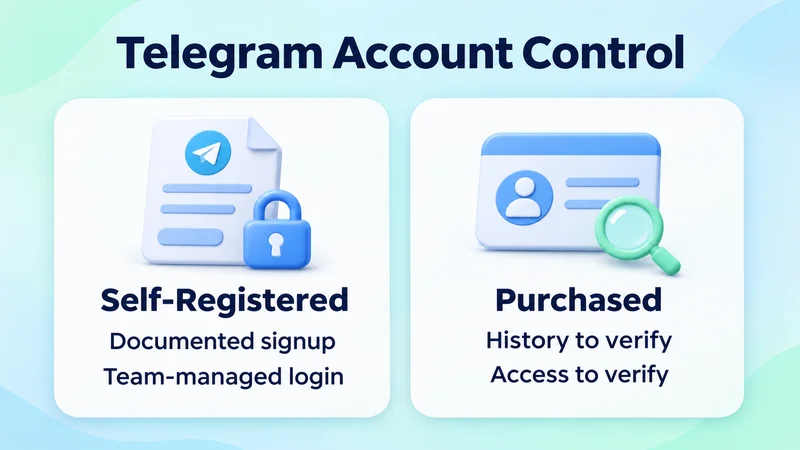
If your team is considering whether to buy Telegram accounts, check what you know about prior activity, who controls account recovery, and whether the team is authorized to use the account. For ongoing customer support or community operations, register work accounts through Telegram and document who manages their sign-in and recovery.
What counts as a self-registered or purchased Telegram account?
A self-registered Telegram account is created through Telegram’s signup process with a phone number you or your organization can manage. Your team can record when the account was created, who is responsible for it, and which devices have access.
A purchased Telegram account is an existing account obtained from a third party. Listings may describe it as pre-registered, aged, or supplied with a Telegram Session. Those labels describe the account’s age or how access is provided. Verify its history, recovery access, and authorization before considering it for business use.
Compare Telegram account security and control
What to compare | Self-registered work account | Purchased account |
Registration history | Your team can document signup and subsequent use. | Prior activity and past restrictions may be hard to verify. |
Sign-in and recovery | Your team can manage the linked number, verification, and recovery details. | Other people may still control recovery details or retain active sessions. |
Responsibility | You can assign an owner and record access changes. | Authorization and responsibility can be unclear. |
Day-to-day operations | Your team can keep a history of status checks and handovers. | Unresolved access issues can interrupt support and other work. |
Three risks of using purchased Telegram accounts
Unverified activity and Telegram account restrictions
A purchased account may have received spam reports or had messaging restrictions before your team received access. Telegram’s spam rules apply to both account types. The platform reviews reports and can restrict accounts for confirmed spam. Check the current account status before assigning it to customer conversations.
Unclear login and recovery control
A successful sign-in confirms that you have access at that moment. Check who controls the linked phone number, the two-step verification password, the recovery email if configured, and existing sessions. Someone who still controls a recovery method or an active session may retain access.
Unclear authorization and compliance
Telegram’s Terms of Service prohibit using the service for spam or scams. When an account comes from a third party, verify who can authorize its use and how your team may handle any existing messages or customer data. Follow the platform terms and the rules that apply in the markets you serve.
When to register a team-owned account
Use team-owned accounts for ongoing support, content publishing, and brand communities. Assign a responsible owner, document access changes, and use recovery details the team can manage. Hold onboarding when the account’s origin, authorization, or recovery control is unclear.
Common onboarding mistakes
Choosing by age. Check account history and current messaging status.
Going live too soon. Make time to verify ownership and recovery access.
Relying on a single login. Review recovery settings and active devices.
Skipping source checks. Confirm authorization before connecting an account to a workspace.
How to verify an authorized Telegram account
Document authorization. Record the source, owner, intended use, and sign-in administrator.
Test internally. Check sign-in on a team-controlled device. Use an expected test message from a teammate to verify receipt and replies.
Review before rollout. Log issues and platform notices. Pause on restrictions or unfamiliar access. Resume after resolving the issue and verifying control.
Send commercial updates to people who agreed to receive them. Record the outcome of each check.
Frequently asked questions
What is the main difference between purchased and self-registered Telegram accounts?
Self-registration lets your team document signup and recovery control from day one. For a purchased account, verify past use, authorization, and access.
Does buying a Telegram account violate Telegram’s rules?
Telegram’s general terms prohibit spam and scams. Check the applicable terms and confirm who can authorize access before onboarding a third-party account.
Does changing the linked phone number secure the account?
Telegram’s Change Number feature preserves contacts and cloud chat history. Verify the new number, two-step verification, and any recovery email. Review the device list and revoke unrecognized sessions through Telegram.
Do Premium or aged accounts have fewer restrictions?
Telegram’s spam rules apply to Premium subscribers. Check the current messaging status for accounts of any age.
Manage authorized Telegram accounts with GeekGram
Use GeekGram for Telegram multi-account management, account status checks, and task scheduling. Start with one team-owned work account to verify the workflow before adding accounts.
New users can start a free 3-day GeekGram trial with 200 account slots.
Originally published by Geekgram. Please credit the source when reposting.