How to Build a Telegram Contact Database
The article outlines building a Telegram contact database using GeekGram to track inquiries, manage permissions, and automate responses. It details a four-step

A Telegram contact database gives sales and support teams one place to record where an inquiry came from, what the customer asked, and who should follow up. If leads go quiet after the first reply or two agents answer the same question, start by organizing the contacts you already have permission to reach. This Telegram marketing guide walks through account setup, contact tagging, keyword replies, and team handoffs.
Why Telegram marketing teams need a contact database
A contact list tells you who someone is. A database also records how they reached you, what messages they expect, and what the team agreed to do next. A shared spreadsheet may be enough for one person handling a few inquiries. Teams managing multiple Telegram accounts need clear ownership and access permissions so customers receive a consistent response.
Field | What to record |
Contact and source | The contact identifier, where the inquiry came from, and when it arrived |
Messaging preferences | Which messages the contact agreed to receive and any opt-out |
Stage and interest | An actionable label such as New inquiry, Pricing requested, or Customer |
Owner and next action | Who follows up, what they agreed to do, and when |
Four steps to build your Telegram contact database
1. Set up work accounts and assign access
Start with Telegram accounts your business is authorized to manage. In GeekGram, open Account Import and choose the supported import format. If you use a ZIP archive, follow the file requirements, select the account group, and check the import status before assigning accounts to support seats.
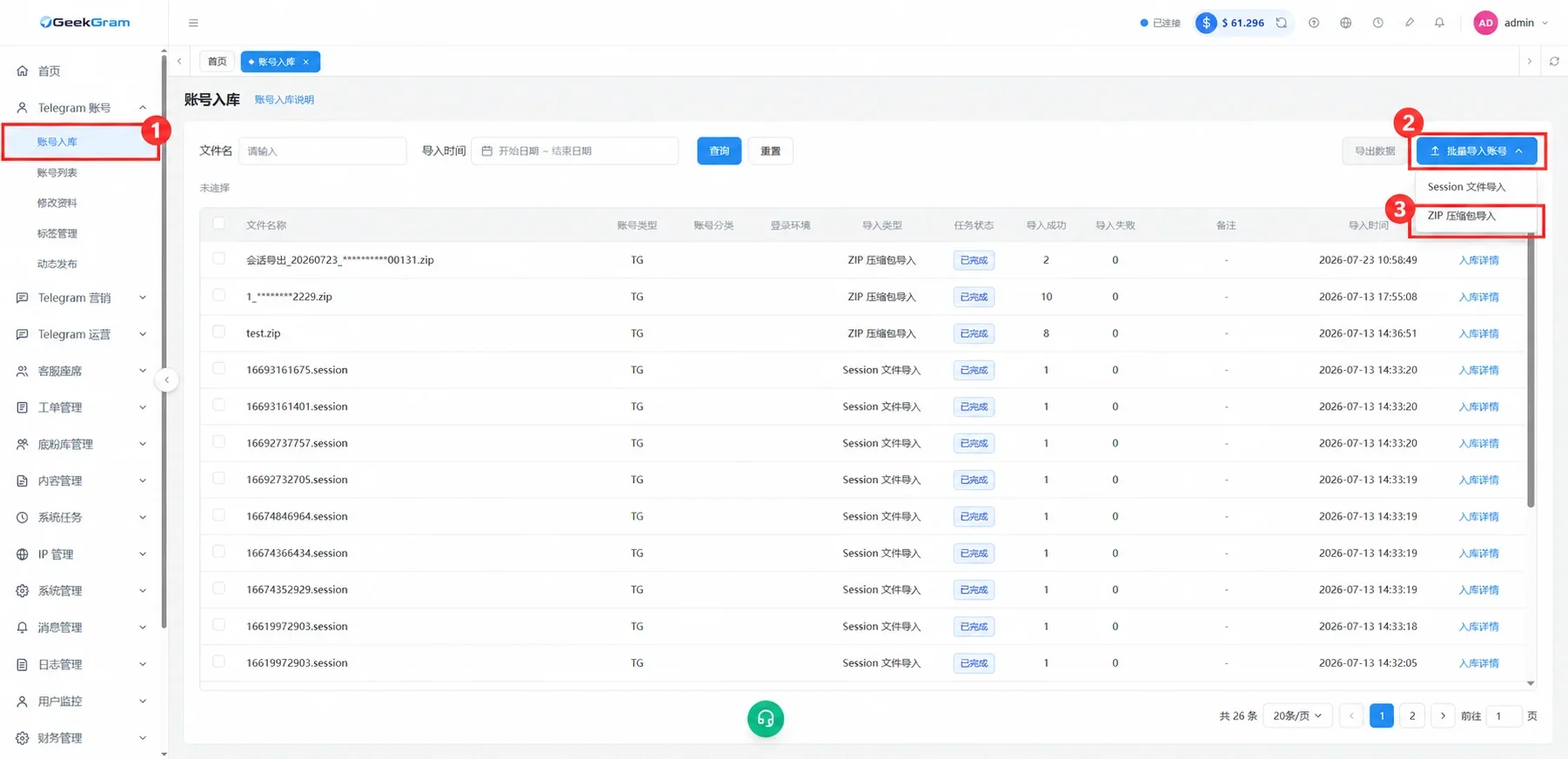
Figure 1. Telegram account import with the ZIP archive option.
Name an owner for each account and give access to the agents who need it. If your IT team requires a specific network configuration, have an administrator apply the approved settings and verify sign-in on a test account before expanding the setup.
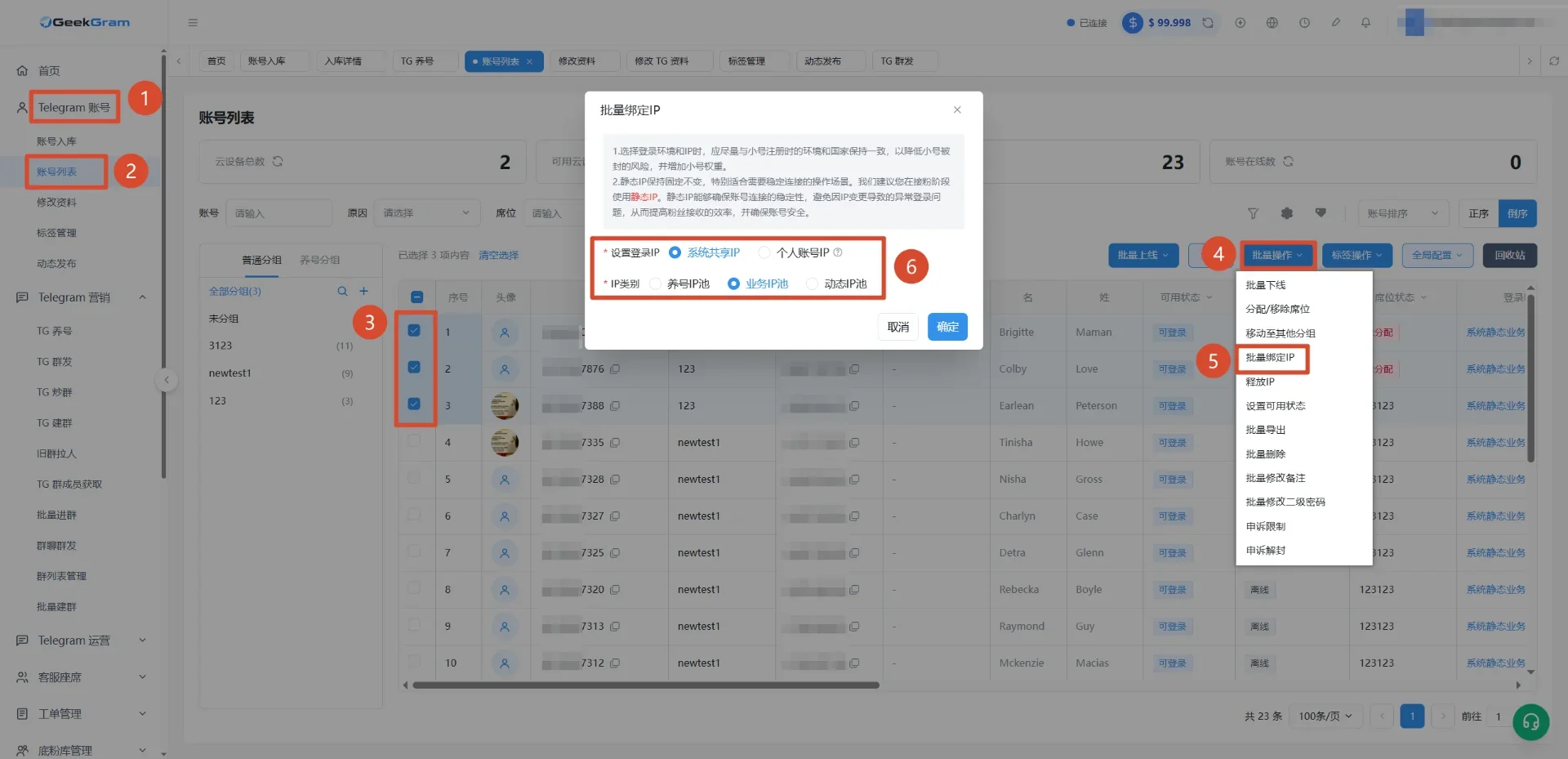
Figure 2. Bulk IP binding settings for selected Telegram work accounts.
2. Import contacts and tag them for follow-up
Start with people who contacted your team or signed up for messages from your business. Keep a record of how each person gave permission, and honor opt-outs. A support inquiry gives you a reason to address that question. Ask separately before sending promotional updates.
In GeekGram, open Telegram Contact Data, download the import template, and fill in the required fields. Select the identifier type and the support seats that need access, then upload the file and review the result. For Telegram lead nurturing, use tags that suggest a next action. For example, Pricing requested can cue a plan comparison, while Customer can route the next question to onboarding or support.
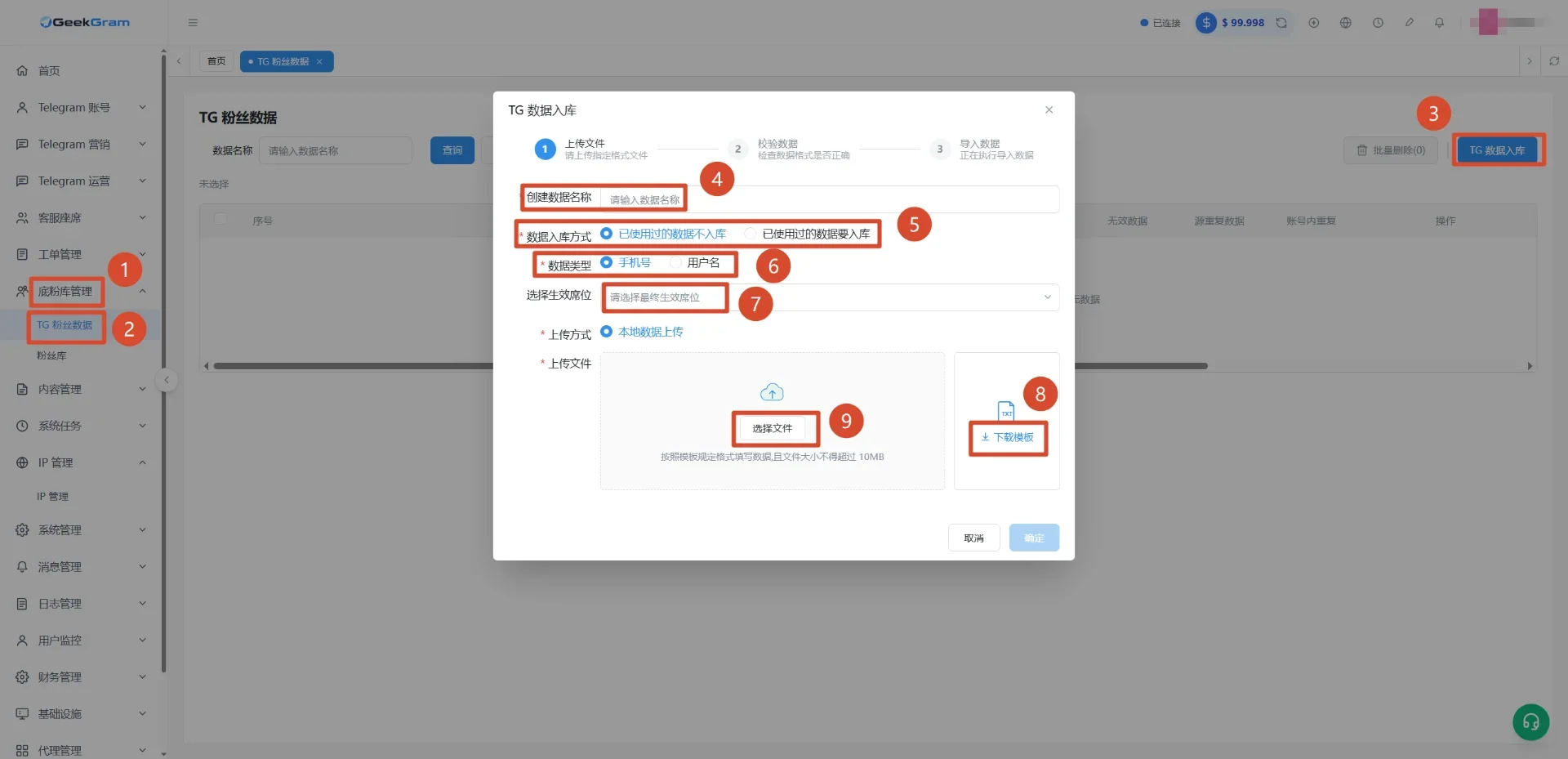
Figure 3. Telegram Contact Data import form with identifier type, seat access, and template download.
3. Set up Telegram marketing automation for routine questions
Build a library of approved replies for repeat questions about pricing, support hours, and getting started. In GeekGram, use Keyword Management to link an inbound phrase to the relevant reply. Choose exact or partial matching, then test how the rule responds to common variations and unrelated messages.
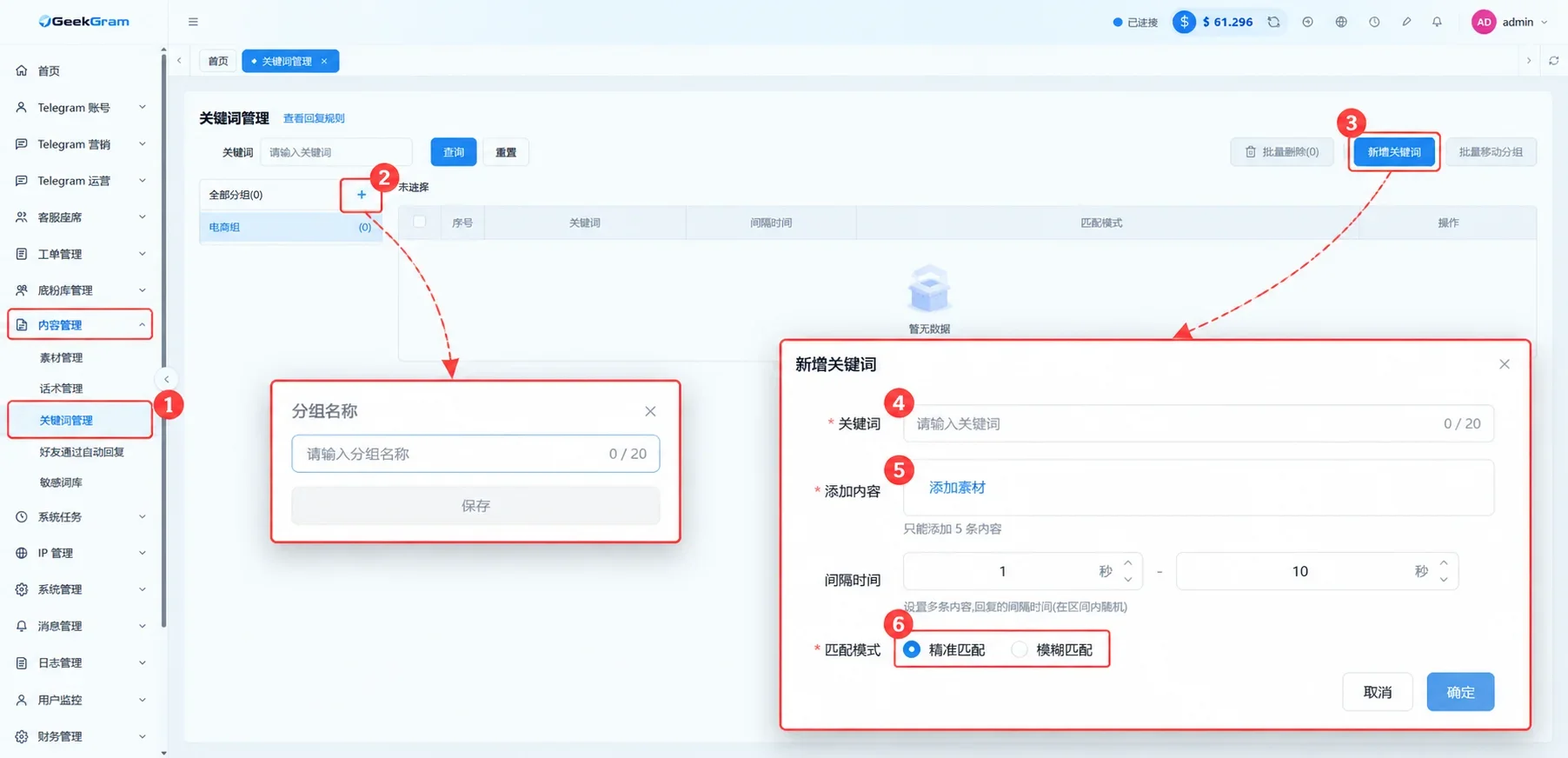
Figure 4. Keyword auto-reply setup with reply content and match mode.
Keep Telegram follow-up messages tied to the original request. A pricing reply can point to the plan page. If a customer asks which plan supports their team, assign the conversation to an agent who can confirm the details.
4. Route conversations through a Telegram shared inbox
GeekGram’s web chat workspace brings conversations from assigned Telegram accounts into one view. Agents can review notes and tags before responding and use two-way translation when customers speak a different language.
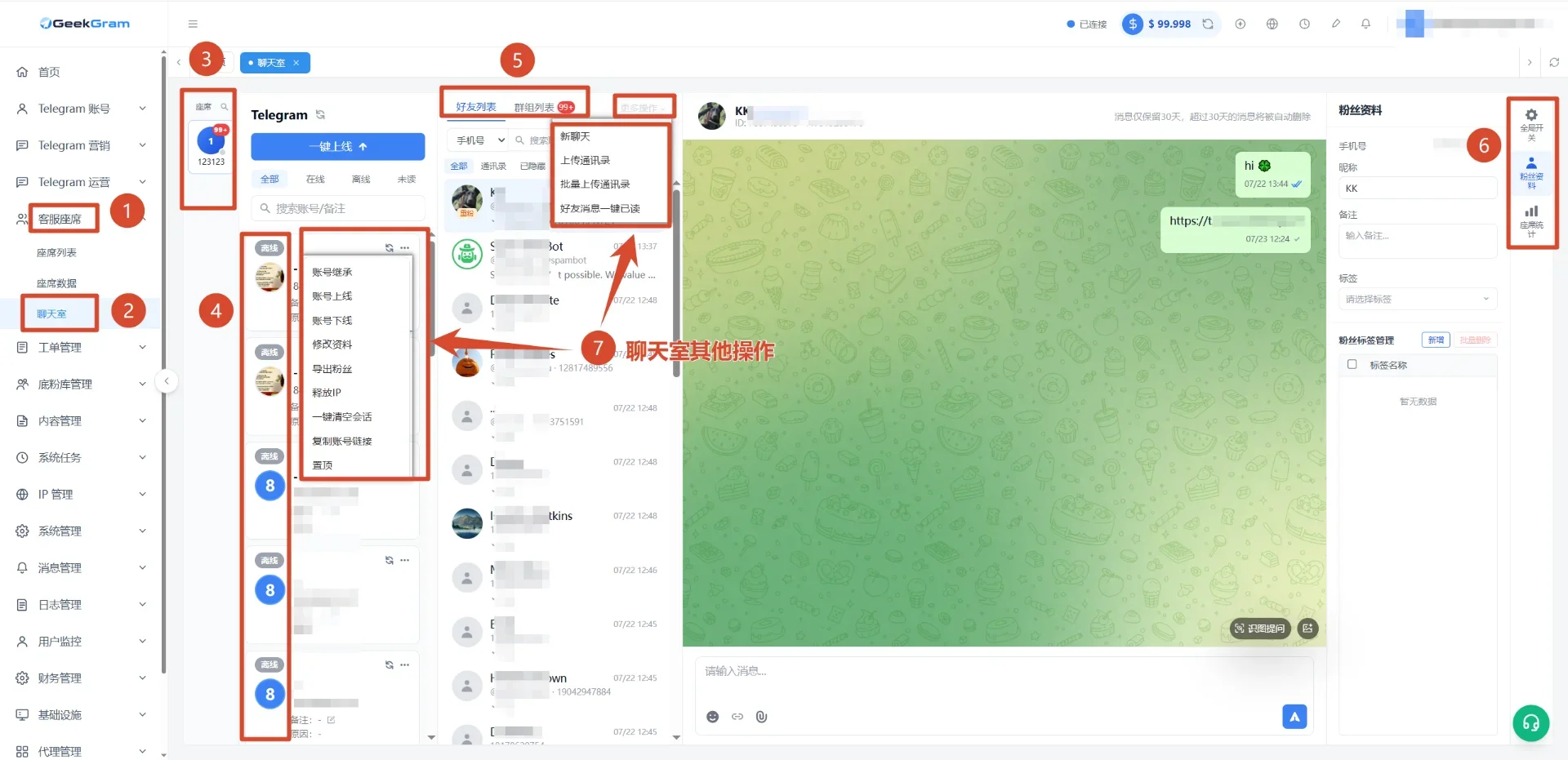
Figure 5. Shared Telegram inbox with account selection, conversation list, and contact notes.
Use lead intake work orders to associate support seats, set daily targets, and choose reset times. Check access settings before sharing a work order link. To measure Telegram customer conversion, pick one outcome, such as a booked demo, and track how many eligible inquiries reach it. Compare that rate with first response time and the number of conversations without an owner.
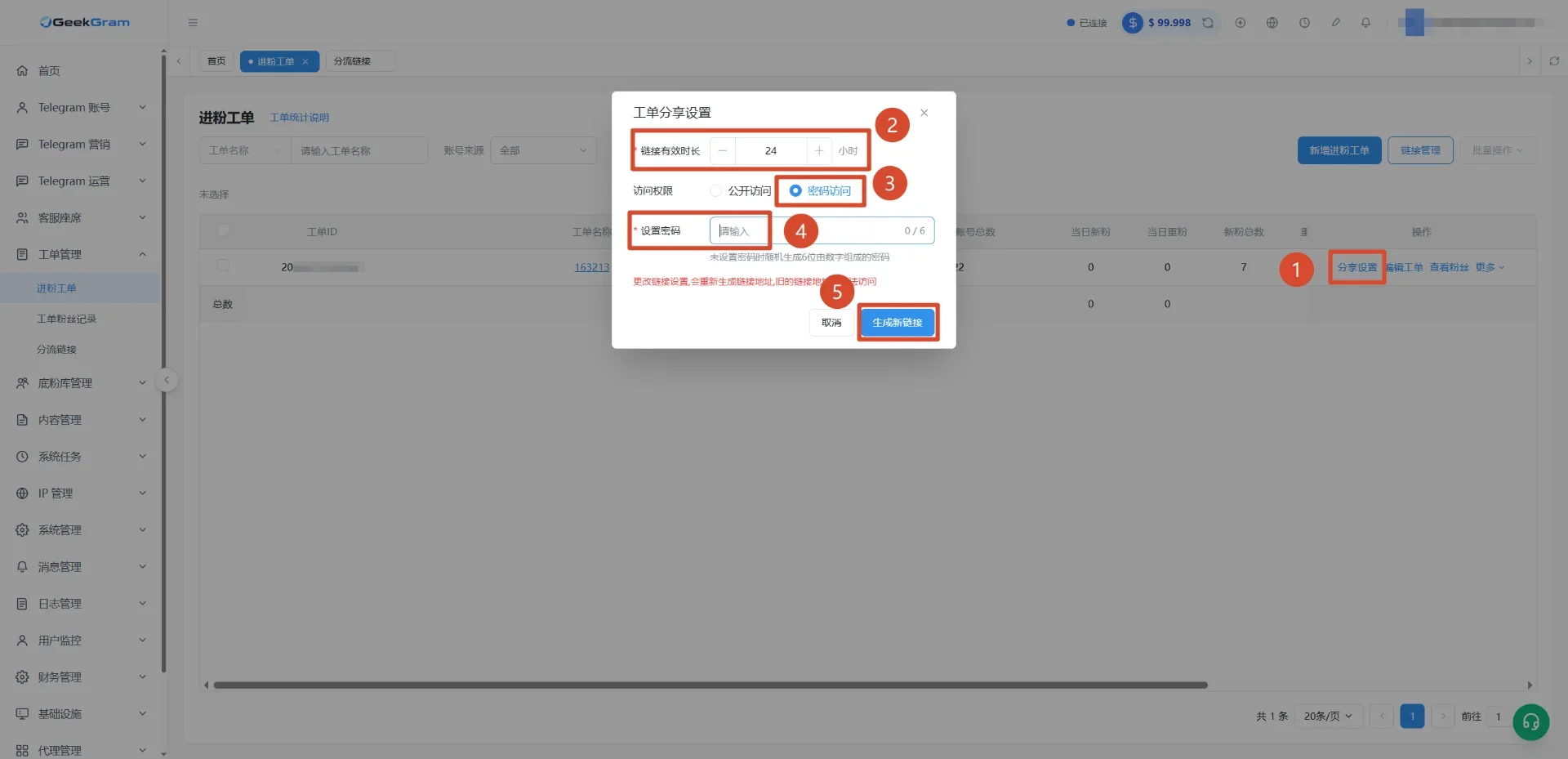
Figure 6. Lead intake work order sharing settings for link duration, access, and password.
Frequently asked questions
What are the risks of using purchased Telegram contact lists?
If you lack a documented source or permission to message someone, leave them off the send list. Unsolicited messages can be reported and lead to account restrictions. Collect only the data your team needs and follow the privacy rules that apply to your business.
Can Telegram auto-replies improve conversion on their own?
Auto-replies can answer routine questions quickly. Give an agent ownership of conversations that need judgment, such as evaluating a plan, resolving a billing issue, or handling an unusual return. Track the outcome of those conversations to see where automation helps.
Can a dedicated IP prevent Telegram account restrictions?
Telegram can restrict accounts that use a dedicated IP. If a restriction appears, pause the affected activity and review recent messages. If you believe it was applied in error, contact Telegram’s official @SpamBot.
When does a team need Telegram marketing software?
Start with a shared contact log. Add Telegram marketing software when agents need account access, saved replies, or more reliable handoffs.
Pilot a contact import, keyword reply, and team handoff in GeekGram. New users can try GeekGram for three days with 200 account slots.
Originally published by Geekgram. Please credit the source when reposting.